About Our Instagram Profile Picture Maker
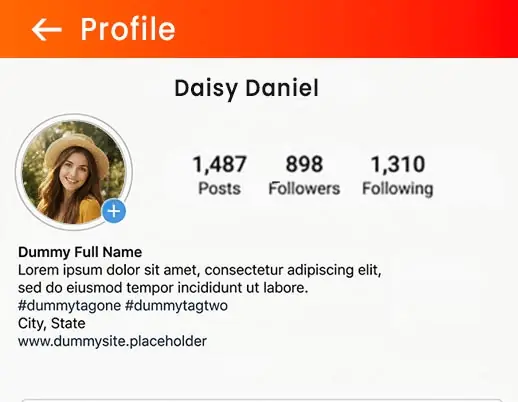
This tool is built specifically to help creators, brands, and everyday users make clean, recognisable Instagram avatars. Instagram shows profile photos inside a circle - our live preview and precise circular crop make sure the important part of your photo (face, logo, initials) stays visible at small sizes.
No design skills needed: crop, center, and export multiple options fast. Use the PNG export for design work or JPG for a simple upload-ready image.
Easy Steps to Create Your Instagram DP
Follow these simple steps to create an Instagram profile picture that looks clear everywhere - on your profile, in follower lists, and next to comments.
- Upload one photo or many: Try headshots, logos, or stylised icons to see which one looks best as a small circular profile picture.
- Center the important part: Keep your face, logo, or main subject inside the safe center area, since the outer corners will be cropped in a circle.
- Adjust with zoom & rotate: Small changes can make a big difference at thumbnail size, helping your profile image look sharper and easier to recognise.
- Choose the best format: Use PNG for cleaner quality and design elements, or JPG for a simple, lightweight Instagram-ready image.
- Download your Instagram DP: Export your final Instagram profile picture in the recommended size, or choose a custom size with this Instagram DP maker for better quality and reuse.
What this Instagram profile pic maker does for you
🎯Center-first crop
Keeps faces, logos, or important elements visible after Instagram applies its circular mask, ensuring your avatar looks perfect at small sizes.
🖼️Batch testing
Upload multiple images at once to quickly compare avatars and choose the one that performs best on your feed or profile.
🔧Fine controls
Zoom, pan, and rotate your photo to get pixel-perfect framing, even at Instagram’s tiny thumbnail scale.
⬇️PNG & JPG exports
Download in PNG for design projects and overlays, or JPG for direct upload to Instagram — all high quality.
📱Mobile-first
Designed for quick on-phone edits so you can update your Instagram avatar anytime, anywhere.
🎨Creative thumbnails
Circular avatars are great for story highlight cover, group icon, or pinned post thumbnail to keep your Instagram feed and profile visually consistent.
Where a great Instagram avatar helps
✨Profile recognition
Your avatar is often the first visual people see when they discover your account. A clear, centered headshot or logo increases follow and engagement chances because it stays readable even at tiny sizes.
🧩Brand consistency
Use a circular logo or consistent color background so your presence is instantly recognisable across posts, stories, and on other platforms where your Instagram handle appears.
🧪A/B testing avatars
Quickly produce several avatar styles — minimal, photo, or branded — then swap them in-app to see which one wins more profile visits or clicks.
📣Creator & business use
Creators should pick a face-forward crop; businesses benefit from a simple legible mark or initial that scales cleanly to small sizes.
Sizes, Display & Upload Tips for Instagram
Instagram shows profile pictures inside a circular frame, so use a square image and keep the key part centered. For the sharpest result, upload a high-resolution square image - many experts recommend 1080x1080 px or at least 320x320 px - so your avatar stays crisp even after Instagram compresses it.
| Recommended | Why This Works |
|---|---|
| 1080 x 1080 px | High resolution keeps edges sharp on modern phones and retina displays. Gives room to adjust the crop without losing quality. |
| 320 x 320 px | Safe minimum size for uploads. Fast to upload and still clear on mobile devices. |
| 110 x 110 px (display size) | Typical display scale on mobile — make sure your subject is readable even at small sizes. |
Why this Instagram avatar maker
Built for visual-first platforms, this tool helps you produce avatars that look good on Instagram’s feed, profile, and comment sections. It’s quick, private (edits stay in the browser), and made to give you pixel-perfect results for profiles and businesses.
- Design for small sizes: Preview at thumbnail scale so your avatar is recognisable anywhere.
- Multiple formats: PNG for layered work and JPG for direct uploads — both fully supported by Instagram.
- Fast testing: Create and compare many avatar styles with batch uploads.
- No signup, no limits: Edit and export as much as you want for free.
Practical tips for Instagram profile photos
- Use a close crop: Head-and-shoulders fill the circle and read clearly at tiny sizes.
- High contrast helps: Separate your subject from the background so it stands out in small previews.
- Avoid small text: Text rarely reads at avatar size — use initials only if they’re bold and simple.
- Match your brand: Keep colours and logo placement consistent with your feed for instant recognition.
- Check next to story ring: Avoid a busy outer edge that clashes with Instagram’s story highlight ring.
Related Tools & Guides
FAQs - Instagram Profile Picture Maker
- Will Instagram accept PNG avatars with transparency?
- Instagram supports PNG uploads, but sometimes transparent areas may appear flattened. For most profile uses, JPG or PNG both work - choose PNG if you want to reuse the avatar in designs.
- What size should I upload?
- Upload a square image at high resolution - 1080x1080 px is recommended, or at least 320x320 px - to ensure your avatar stays sharp after Instagram compression.
- Can I make multiple avatar options at once?
- Yes - you can batch upload multiple images, crop them, and pick the one that looks best in the circular preview.
- Will this tool change my image quality?
- No - exports retain the original resolution you choose. Uploading a larger square image ensures high-quality results even after Instagram compresses it.
Want to make your Instagram DP now?
Upload a photo, center the subject in the circular preview, and download a sharp Instagram profile picture in seconds — free and unlimited.