About Our Facebook Profile Picture Maker
Facebook displays profile photos in a square crop that often gets shown in a circular view in many places across the site. This Facebook Profile Pic Maker helps you prepare your image so the face or key visual stays centered and looks crisp on desktop, mobile, and page profiles.
It’s easy: upload your photo, position it inside the preview area, then download the result at a size that fits Facebook’s recommended size range for profile pictures. Whether you want to use a selfie, a business logo, or a creative avatar, this tool ensures your image fits just right.
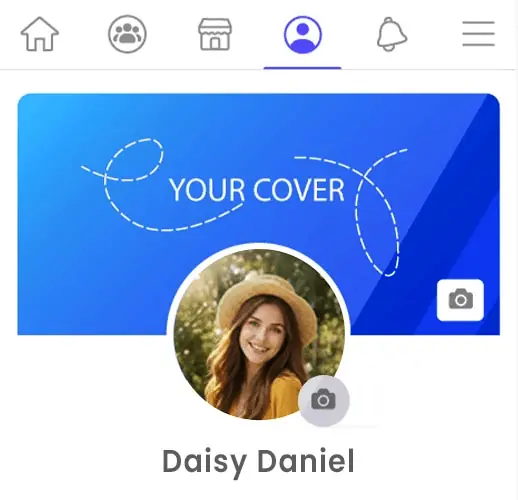
How to Make a Facebook Profile Picture
Creating a good Facebook profile picture should be quick and simple. With the right crop and a clear image, your profile photo can look much better on your personal profile, business page, or public account.
- Upload your photo: Select a clear image from your device. A square or near-square photo usually works best because Facebook profile pictures are displayed in a compact frame.
- Adjust the crop area: Move and scale the image so your face, logo, or main subject stays centered. This helps avoid unwanted cropping and keeps the important part of the photo clearly visible.
- Check the live preview: Use the preview to see how your Facebook profile pic will look before downloading. This makes it easier to create a balanced and professional-looking result.
- Download your image: Once everything looks right, download the finished file and upload it directly to Facebook as your new profile picture.
Tip: A close-up photo with a clean background usually works better than a wide or busy image. If you are using a logo, keep it centered and leave a little space around the edges so it stays clear in smaller views.
Why Use Our Facebook Profile Picture Maker
This tool is made to help you create a clean and professional Facebook profile picture without wasting time on editing apps. It is simple to use, fully browser-based, and built for people who want the right crop, better framing, and a profile photo that looks sharp on both desktop and mobile.
🖼️Smart Profile Framing
Position your face, logo, or main subject exactly where it should be before downloading. This helps you avoid awkward cuts and keeps your Facebook profile photo looking balanced in different profile views.
👀Live Preview Before Download
See how your image looks while you adjust it. The real-time preview makes it much easier to create a better Facebook profile pic without guessing how the final image will appear after upload.
📂Upload Multiple Photos
Want to compare different selfies, portraits, or logo versions? Upload multiple images together and create several Facebook profile picture options faster, so you can choose the one that looks best.
⬇️High-Quality Downloads
Download your finished image in high quality so it stays clear after Facebook resizes or compresses it. A sharper source image usually gives a better result across profile, timeline, and page displays.
📱Works on Mobile and Desktop
Use the tool on your phone, tablet, laptop, or desktop browser. Whether you are updating a personal account or a Facebook page, you can make a new profile picture from any device without installing anything.
💯Free, Unlimited, and No Sign-Up
Make as many Facebook profile pics as you want. The tool is completely free, has no forced sign-up, and can be used anytime you need a quick profile photo update for your account, page, or brand.
Why Your Facebook Profile Photo Matters
👤Personal Profiles
A sharp, well-cropped profile picture helps friends and followers instantly recognize you in feed posts, comments, and stories.
Your face should be clear and centered — especially for personal branding and real connections on Facebook.
🏢Business & Pages
Business pages need professional profile images that represent your brand clearly. Logos or brand marks should sit well inside the frame for consistency across posts and ads.
Keeping the focus centered and balanced makes your business easier to recognize in news feeds and search results.
🎉Community & Event Profiles
Group pages, events, and special community accounts benefit from profile pictures that look polished and inviting. Whether it’s a logo, mascot, or group photo, make sure it’s framed right for Facebook’s display.
Recommended Dimensions for Facebook Profile Pictures
Facebook profile pictures work best when you upload a clear square image. A minimum size of 180 × 180 pixels is commonly used, but uploading a larger image such as 720 × 720 pixels or 1080 × 1080 pixels helps keep your profile photo sharp and clear on both desktop and mobile.
Since Facebook may show your profile picture at different sizes in comments, feeds, page previews, and profile headers, using a higher resolution square image gives better results. Keeping your face, logo, or main subject centered is also important so nothing important gets cut off in smaller views.
Tips for a Better Facebook Profile Picture
- Use a clear and sharp image: A high-quality photo helps your Facebook profile picture look professional and avoids blur after upload.
- Keep your face or logo centered: Facebook profile photos are often displayed in smaller sizes across the platform, so placing the main subject in the center makes it easier to recognize.
- Choose a simple background: Clean backgrounds help your face, brand logo, or icon stand out more clearly in comments, posts, and search results.
- Avoid too much empty space: A close-up crop usually works better than a distant photo because it makes your profile picture easier to see on mobile and desktop.
- Try more than one version: If you are not sure which crop looks best, create a few profile picture options and compare them before uploading to Facebook.
Related Tools & Guides
FAQs – Facebook Profile Pic Maker
- What is the best size for a Facebook profile picture?
- A square image works best for Facebook profile pictures. While 180 × 180 pixels is a common minimum, using a larger size like 720 × 720 pixels or 1080 × 1080 pixels usually gives a sharper and cleaner result.
- Can I make a Facebook profile picture online for free?
- Yes, you can create a Facebook profile picture online for free using this browser-based tool. Just upload your image, adjust the crop, preview the result, and download it instantly.
- Why does my Facebook profile picture get cropped?
- Facebook uses a square profile image format and may show it differently across the platform, such as in profile pages, comments, and feeds. Keeping the important part of the image centered helps avoid unwanted cropping.
- Can I use a logo as my Facebook profile photo?
- Yes, logos work very well for Facebook pages and business accounts. Make sure the logo is centered and large enough to stay clear when shown in smaller sizes.
- Does this Facebook profile picture maker work on mobile?
- Yes, this tool works smoothly on mobile browsers, tablets, and desktop devices, so you can make and download your Facebook profile picture from anywhere.
Ready to create your Facebook profile picture?
Upload a photo, refine the crop to center your face or logo, and download a perfect Facebook profile picture — free, fast, and browser-based.